
Best Mobile Gaming Controllers for iPhone and Android in 2026
Jeffery Mr
Quick answer: The best mobile gaming controller is the one that fits both your games and the way you hold your screen. For a lightweight controller you can carry with a phone or tablet, shortlist the AceGamer T50. For a handheld setup with the phone mounted between the controls, consider the GameSir G8 Plus Bluetooth. For a familiar full-size pad that also serves an Xbox or PC setup, consider the Xbox Wireless Controller.
Before buying, confirm your game's controller support on iPhone or Android. A successful Bluetooth connection is only the first step.
Physical controls can make a controller-supported mobile game easier to operate without covering the screen with your thumbs. But choosing a controller involves more than finding the longest specification list. You also need somewhere to put the phone, a layout that suits your hands and support for the games you actually play.
This guide compares three useful approaches: a pocket controller, a telescopic phone controller and a full-size wireless controller. Each has a clear use case, and each involves a different compromise.
About our recommendations: This AceGamer guide includes our own T50. Selections are based on published manufacturer specifications and suitability for different setups, rather than comparative hands-on testing or measured performance rankings.
Mobile gaming controllers compared
Start with the physical setup. A small controller is convenient to pack, while a controller that holds your phone is convenient to use without a table. Those are different advantages.
| Controller | Recommended use | Phone setup | Main trade-off |
|---|---|---|---|
| AceGamer T50 | Lightweight travel and tabletop play | Standalone Bluetooth controller; use a separate phone stand | Compact controls and standard analog sticks rather than Hall Effect or TMR sticks |
| GameSir G8 Plus Bluetooth | Playing with the phone mounted between the grips | Telescopic holder with Bluetooth connectivity | Check device fit, case clearance and the exact model version |
| Xbox Wireless Controller | Players who prefer a familiar full-size layout | Bluetooth connection; use a stand or compatible separate phone clip | Larger to carry than a pocket controller; phone mounting is separate |
Price should be compared across the complete setup. Include a stand, mounting clip or other accessory you need, rather than comparing controller prices alone.
AceGamer T50: our pocket-focused pick for mobile travel
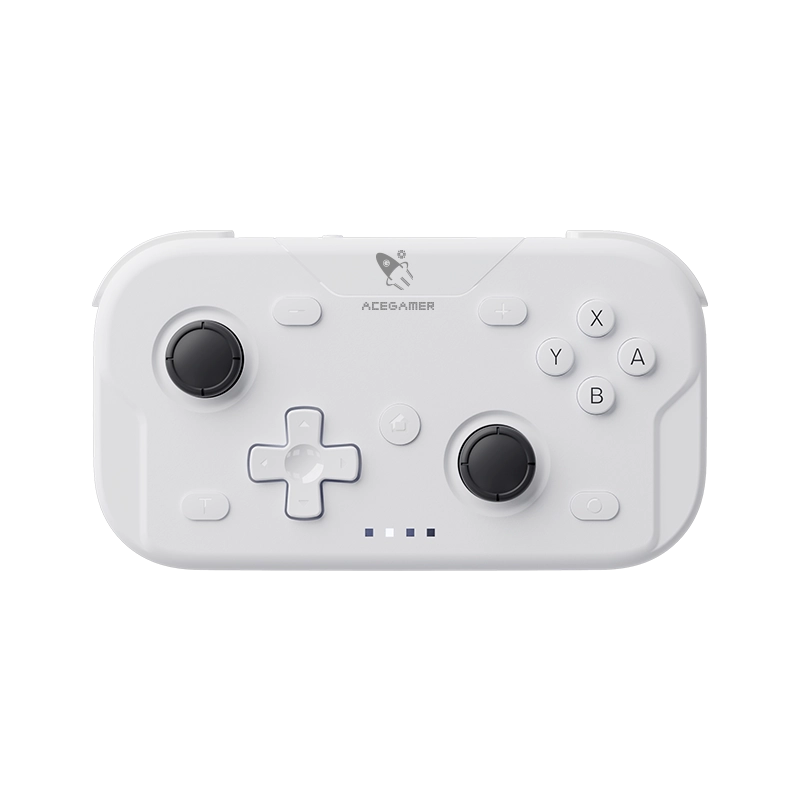
The AceGamer T50 is listed at $29.99 and weighs 94 g. Its compact body and fold-down joystick design make it worth considering when carrying less equipment is a priority.
It suits a phone propped on a stand, a tablet on a desk or a travel setup where the screen can sit independently. This arrangement lets you choose your viewing distance without holding the weight of the phone between your hands.
- Connection: Bluetooth 5.3, with USB-C wired connectivity also available for supported setups.
- Mobile platforms: iOS and Android are listed as supported.
- Battery: a rechargeable 400 mAh battery, rated for up to eight hours depending on use.
- Portable design: compact controls with sticks that lower for storage.
The buying decision is about portability. Choose the T50 when you want a small standalone pad and already have a practical place to position your screen. If you mainly play while standing or without a nearby surface, a phone-mounted design may fit your routine better.
The T50 uses standard analog sticks. If magnetic stick sensing is your main requirement, compare a different model rather than assuming every modern controller includes it.
See T50 specifications and price for the complete sheet, or use the T50 setup and compatibility guide before pairing.
GameSir G8 Plus Bluetooth: for a mounted handheld setup
The GameSir G8 Plus Bluetooth places the phone between two controller grips. Its official FAQ lists Bluetooth support for iOS and Android, Hall Effect sticks and analog triggers, and a supported device length of 120–215 mm.
This format is worth considering when you want the screen and controls to move together. You do not need to find a table or position a separate stand each time you play.
Measure your device with its case fitted and check camera clearance. The holder's length range alone does not establish that every phone-and-case combination will sit securely.
Also check the full product name: the G8 Plus Bluetooth is a different version from a USB-C model. Connection method, charging features and software support should be verified for the exact version you intend to buy.
Read GameSir’s official G8 Plus compatibility and feature FAQ.
Xbox Wireless Controller: for a familiar full-size layout
Microsoft's Xbox Wireless Controller supports Bluetooth connections to compatible iOS and Android devices, as well as supported Windows setups. It is a sensible option to investigate if you already own one or want the same controller for mobile and Xbox play.
Its main advantage in this comparison is familiarity. If you already like the grip and button layout, using it with your phone may be more practical than buying another controller solely for mobile gaming.
Plan the screen position separately. Use a stand for tabletop play or check the fit of a compatible phone clip. A clip changes the weight distribution, so consider the combined phone-and-controller setup.
Microsoft also notes that some functions vary with the device and connection. Do not assume features such as controller-connected audio behave identically over mobile Bluetooth.
How to check mobile controller compatibility
Check compatibility at three levels: the controller, your phone's operating system and the game or streaming app. All three need to work together.
For iPhone and iPad
Confirm that the controller supports your Apple device and software version. Then check whether your intended games accept external controller input. Pairing successfully in Bluetooth settings does not establish support inside every app.
Apple provides controller customization settings for supported models, but available buttons and features vary. Use the controller manufacturer's instructions for the correct pairing mode.
For Android phones and tablets
Check the game's current Android support specifically. A game available on both Android and iPhone may offer different controller behavior on each platform.
Also distinguish native gamepad support from touchscreen mapping. Native support lets the game recognize controller inputs directly. Mapping translates inputs into touchscreen actions and can require additional software. Verify the game's rules and the manufacturer's supported setup before relying on mapping.
For cloud gaming and remote play
Check the service or streaming app's supported controllers for your device. A controller's general streaming claim does not establish support for every service, operating system or connection mode.
Test your intended app before committing to a controller primarily for streaming. Confirm gameplay inputs, menu navigation and any actions you regularly need.
Should you choose a pocket, telescopic or full-size controller?
Choose a pocket controller when packing space matters
A pocket controller is a practical starting point for occasional sessions, travel bags and screens already supported by a stand. You can place the screen farther away and rest your hands wherever comfortable.
The compromise is smaller controls. If you have large hands or prefer substantial grips, compare dimensions and try the layout during the return period.
Choose a telescopic controller when you want one handheld unit
A telescopic controller is the more suitable format when your phone needs to stay attached to the controls. Compare how the complete assembly feels, including your phone's weight, rather than judging only the empty controller.
Choose a full-size controller when grip familiarity comes first
A full-size pad is worth considering for longer sessions at a desk or sofa, particularly if you already use that layout elsewhere. It takes more room in a bag, but may save you from learning a different control arrangement.
For a broader look at size and layout, read our pocket versus full-size controller comparison.
Bluetooth, wired connections and mobile gaming latency
Bluetooth avoids the need for a physical phone connector. A direct wired connection can suit a dedicated handheld setup, but you must confirm the controller's connector, phone compatibility and case clearance.
Compare specifications by connection mode. The T50's published 1000 Hz figure applies to wired operation; its listed Bluetooth polling rate is 125 Hz. The wired figure should not be used to describe Bluetooth mobile play.
Polling rate is also different from end-to-end latency. The operating system, game, display and connection all contribute to how quickly an action appears on screen. For streamed games, the network adds another variable.
When evaluating a controller, test a familiar game with the same settings and connection you expect to use. That gives you a more useful buying decision than comparing isolated headline numbers.
A practical mobile gaming setup checklist
- Choose your main games. Confirm controller support for each game on your operating system.
- Decide where the screen will sit. Choose a stand, suitable clip or telescopic holder.
- Check the exact controller version. Similar product names can refer to different connection methods.
- Pair using the recommended mode. Follow the manufacturer's phone-specific instructions.
- Test in-game controls. Check sticks, triggers, menus and button prompts before changing advanced settings.
- Evaluate a normal session. Check grip comfort, viewing angle and whether the setup is convenient to carry.
If a T50 pairs but does not respond as expected, start with the T50 common problems and fixes guide.
Which mobile gaming controller should you buy?
- For a lightweight travel kit: consider the AceGamer T50 with a separate stand.
- For a phone mounted between the controls: consider the GameSir G8 Plus Bluetooth after checking fit.
- For a familiar full-size layout: consider the Xbox Wireless Controller, especially if you already own one.
If your priority is a compact controller for supported mobile games and other devices, start with the AceGamer T50. You can also explore our pocket controllers and portable controllers.
Frequently asked questions
What is the best mobile gaming controller for travel?
For travel with a phone stand or tablet, the AceGamer T50 is our pocket-focused recommendation. It weighs 94 g, has fold-down sticks and is listed at $29.99. If you want to hold your phone and controller as one unit, a telescopic controller is the more suitable format.
Will a mobile gaming controller work with every game?
No. Your phone recognizing a controller does not mean every game supports it. Check the specific game's controller support for your operating system, along with any required controller mode. Native controller support and touchscreen mapping are different features.
Does the AceGamer T50 work with iPhone and Android?
AceGamer lists iOS and Android support for the T50. It connects to compatible phones over Bluetooth and works with games and apps that recognize its controller mode. Follow the platform-specific setup instructions and check support for your intended games.
Does a 1000 Hz wired polling rate apply to Bluetooth mobile gaming?
No. A wired polling-rate specification does not establish Bluetooth performance. AceGamer lists the T50 at 1000 Hz wired and 125 Hz over Bluetooth. Polling rate also differs from total input latency, which includes the game, operating system and display.