
Pocket Controller Guides: Buying, Compatibility & Setup
Jeffery Mr
Start here: A pocket controller is a compact standalone gamepad built to take up less space in your everyday kit. Choose one by checking your devices, the controls your games need and how comfortable the smaller layout feels in your hands.
This hub brings together our pocket controller buying guides, comparisons, compatibility information and setup help. If you already know what you need, browse pocket controllers. If you are still deciding, follow the reading paths below.
A controller that is easy to carry can make sense for a phone on a stand, a laptop in a hotel or a handheld console used in tabletop mode. The important question is whether it gives you the controls you need in a size you will actually bring along.
Start with your main device and games. Then compare size, layout, connection options and the features you will use. A compact controller earns its place by fitting your routine, rather than simply being smaller than your home controller.
Find the right pocket controller guide
Choose the question closest to your situation. Each guide below focuses on a specific buying or ownership decision.
| Your question | Recommended guide | What it helps you decide |
|---|---|---|
| What should I buy on a limited budget? | Best Pocket Controllers Under $50 | Which features and formats to prioritize within your budget |
| Will a small controller suit my hands? | Pocket vs Full-Size Controllers | How to weigh carrying size against grip and control spacing |
| Is paying more worthwhile? | Cheap vs Premium Pocket Controllers | Whether additional features justify the extra cost for your use |
| What does the T50 include? | T50 Specs & Price | Its published specifications, connections and product options |
| How do I connect my T50? | T50 Setup & Compatibility Guide | Where to start for your supported device |
| Why is something not working? | T50 Common Problems & Fixes | How to narrow down connection, layout and input problems |
What is a pocket controller?
A pocket controller is a small standalone gamepad designed to take up little space when carried. The category includes different layouts: some have two analog sticks and familiar shoulder controls, while others simplify the layout for particular types of games.
In this guide, “pocket” describes the carrying format. It does not establish a universal size limit, a particular stick technology or compatibility with every device. Those details still need to be checked model by model.
Pocket, portable and mobile: how the terms relate
- Pocket controller: emphasizes a small carrying footprint.
- Portable controller: covers the broader range of controllers you might take away from a fixed gaming setup.
- Mobile gaming controller: emphasizes use with a phone or tablet and may be standalone or attach to the device.
A product can belong to more than one category. For example, a compact Bluetooth pad can be both a pocket controller and a mobile gaming controller when used with a supported phone.
Explore the wider formats in our Portable Controller Guides.
How to choose a pocket controller
1. List your main devices first
Write down the devices you expect to use regularly. Check explicit support for each one, including the required connection mode. A controller that pairs with your phone should not automatically be assumed to work with a console.
Make your most-used device the deciding factor. Occasional secondary compatibility is useful, but it should not outweigh a comfortable, supported setup for your everyday games.
2. Check the controls your games require
Consider whether you need two analog sticks, stick clicks, analog triggers, motion input or a particular D-pad layout. Small controllers can offer different combinations, so compare actual controls rather than photographs alone.
Think through a familiar game: moving, aiming, opening menus and using shoulder inputs. This gives you a practical checklist before you compare optional extras.
3. Evaluate carrying size and playing comfort separately
A controller can fit neatly in a bag while feeling too small during play. Check where your fingers rest, whether shoulder buttons are easy to reach and whether you can use both sticks without crowding your thumbs.
For carrying, consider protruding sticks, protective storage and any cables or stands you need. The complete kit matters more than the controller's weight alone.
4. Check charging and connection details
Confirm how the controller charges and which devices support its wired mode. A USB-C port does not, by itself, establish wired gameplay support on every USB-C device.
Treat battery estimates as usage-dependent figures. Your normal session length and access to charging are more useful buying criteria than the largest advertised number.
5. Prioritize useful features
Choose extras around a specific use. Motion controls matter when your platform and game support them. Remapping matters when it helps your preferred layout. A feature that remains unused contributes little to your setup.
Should you choose a pocket or full-size controller?
A pocket controller is worth considering when you regularly carry a gaming kit, need a small second controller or play with a screen positioned separately from your hands.
A full-size controller may suit you better when larger grips, more control spacing or additional rear buttons are priorities. Comfort is individual: compare how each format fits your hands rather than assuming one size suits every player.
You can also assign different roles to different controllers. A compact pad might serve travel and tabletop sessions, while a larger controller remains in your home setup.
Read Pocket vs Full-Size Controllers for the format comparison. If you are choosing within AceGamer, D4 vs T50 compares the full-size HyperShadow D4 with the pocket-focused T50.
How much should you spend on a pocket controller?
Set a budget after identifying the controls and compatibility you need. Then compare the cost of the complete setup, including any stand, protective case or cable you plan to buy.
When comparing a more expensive model, identify the exact upgrade: different stick sensors, additional inputs, more customization or a preferred grip. Paying more is easier to justify when you can name the benefit you will use.
Price alone does not establish stick technology, software quality or long-term reliability. Check the specification sheet, support information and return terms for the exact model.
- Best Pocket Controllers Under $50 helps you build an affordable shortlist.
- Cheap vs Premium Pocket Controllers explores when additional features may be worth paying for.
AceGamer T50: a pocket controller example
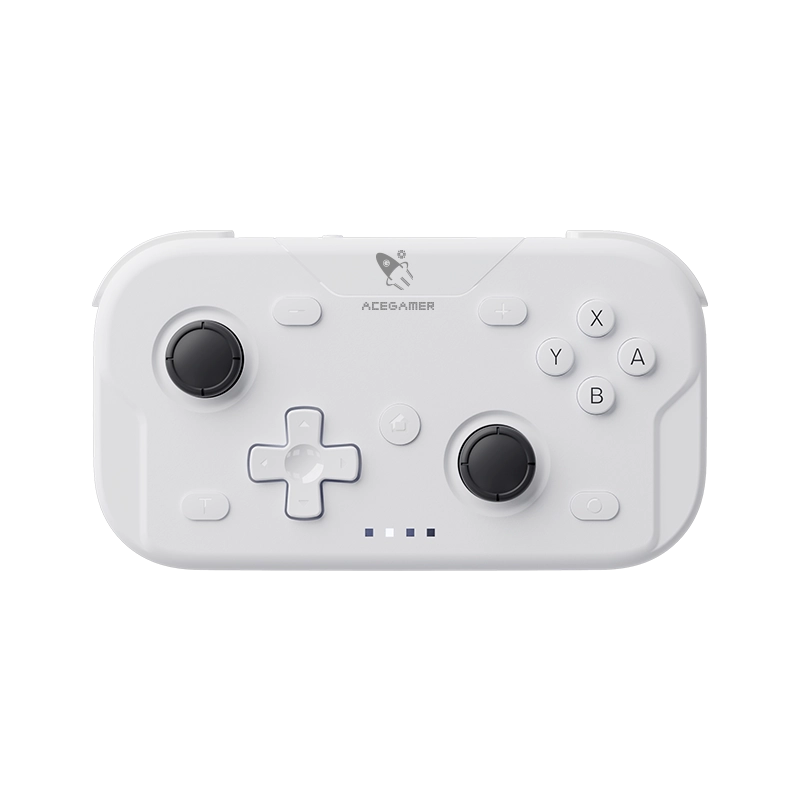
The AceGamer T50 is listed at $29.99 and weighs 94 g. It connects over Bluetooth 5.3 and offers USB-C wired connectivity for supported setups.
Its published features include a 6-axis gyro, dual-motor vibration, Turbo and switchable ABXY layouts. The 400 mAh battery is rated for up to eight hours, depending on use.
The T50 uses standard analog sticks with a lift-and-down design. Its focus is a small carrying format; it should not be described as a Hall Effect or TMR controller.
Choose your next T50 guide:
- Specs & Price — check the published hardware details.
- T50 Review — explore the existing product assessment.
- Setup & Compatibility — find the starting point for your device.
Pocket controller compatibility by platform
Compatibility has several layers: the controller must support the device, use the correct connection mode and provide the inputs your game expects. Optional functions can vary even when basic gameplay works.
Nintendo Switch and Switch 2
Check the exact console generation in the support list. Then verify any features you rely on, such as motion controls, console wake and additional buttons. General compatibility does not promise the complete feature set of a first-party controller.
For the T50, start with T50 Switch 2 Compatibility, then follow How to Connect the T50 to Switch 2.
Windows PC
Confirm the supported controller mode and connection method. After connecting, check that the game recognizes the controller and that the button layout matches your expectations.
If both wired and Bluetooth modes are available, compare their specifications separately. The T50 lists 1000 Hz wired and 125 Hz over Bluetooth; those figures describe different connection modes.
iPhone, iPad and Android
Check support for your operating system and your games. A controller appearing in Bluetooth settings does not mean every mobile game will accept its inputs.
Plan your screen position too. A standalone pad works well with a supported screen on a stand; a phone-mounted controller serves a different physical setup.
Steam Deck
An external controller is useful to consider for tabletop, docked or local multiplayer play. Confirm controller recognition, player assignment and the layout used by your games.
Our Steam Deck controller guide explores options for those situations.
Cloud gaming and remote play
Check the streaming app's supported controllers on your device. Treat native console connectivity and input through a streaming app as separate compatibility questions.
A useful test includes both gameplay and menus, since you may need different inputs to launch, navigate and play a streamed title.
Getting started with a pocket controller
- Charge the controller. Follow its recommended charging instructions before the first session.
- Select the correct mode. Use the manufacturer's instructions for your device.
- Connect the controller. Pair through the device's controller or Bluetooth settings, or use a supported wired connection.
- Test a controller-supported game. Check both sticks, face buttons and shoulder inputs.
- Adjust the layout. Use available in-game, system or supported controller settings.
- Test optional features separately. Confirm motion input, vibration or remapping where supported.
If something does not work, narrow down the symptom
- Not visible during pairing: check that the controller is in pairing mode for the intended device.
- Connected but unresponsive in one game: check that game's controller support and input settings.
- Unexpected button actions: check the controller mode, ABXY layout and saved mappings.
- One optional feature is missing: confirm support for that feature on the current platform and connection.
Change one setting at a time so you can identify what resolves the issue. For model-specific help, use T50 Common Problems & Fixes and the User Manual page.
Build a pocket gaming setup that suits you
Before buying, write down your main device, the game you play most and the carrying space available. Those three details help you filter out controllers that look appealing but do not fit your routine.
Frequently asked questions
What is a pocket controller?
A pocket controller is a small standalone gamepad designed to take up little space when carried. Models differ in button layout, analog sticks, connection methods and platform support. Some include folding or retractable sticks, while others use a flat design.
Are pocket controllers the same as phone controllers?
The terms overlap, but describe different priorities. Pocket describes a controller's compact size. A phone controller may instead be designed to hold a handset between its grips. Check whether the product is standalone, attaches to a phone or supports both arrangements.
Does the AceGamer T50 have Hall Effect or TMR sticks?
No. The T50 uses standard analog sticks with a lift-and-down design. Its main focus is portability. If magnetic stick sensing is a priority, compare a model that explicitly lists Hall Effect or TMR joysticks.
Can one pocket controller work with several devices?
Yes, when the controller explicitly supports those platforms. Confirm the required connection and mode for each device, and check game-specific features separately. Multi-platform support does not necessarily mean simultaneous connections or identical features on every platform.
Is a pocket controller suitable for long gaming sessions?
It depends on your hands, grip and preferred games. Compact controls can be convenient to carry, while a full-size controller may provide more space for your fingers. Test comfort in a normal session rather than choosing from dimensions alone.